How I Integrated Redis Caching Into My Django Portfolio
How I Integrated Redis Caching Into My Django Portfolio
I like improving performance on the projects I build, even when they are small. My personal portfolio at https://mrphilip.cv is built with Django and hosted on the Python runtime on Vercel. It is relatively simple, but I wanted to see how far I could push the performance without rewriting the entire application. I decided to add server side caching using Redis to reduce database hits and cut down the response time.
The repository for this project is here:
https://github.com/philiptitus/Portfolio.git
This write-up walks through the exact steps I took and the results I observed.
Why I Considered Server Side Caching
My portfolio site is mostly static. It displays my skills, projects, job experience, awards, certificates, and blogs. These items do not change frequently. Yet every request triggered full view rendering and multiple database queries. Django is fast, but on a serverless environment like Vercel, cold starts can push response times higher than I would like.
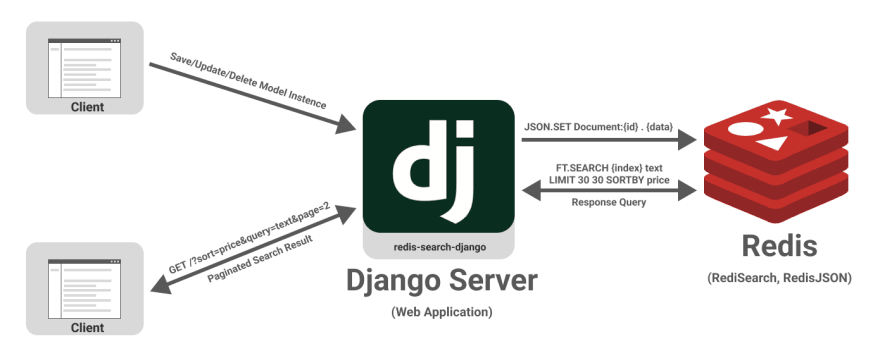
I wanted to keep everything exactly as it was, but reduce unnecessary work. Full page caching seemed like the right choice. The approach is simple. Cache the rendered HTML for a defined period so the server does not need to re run database queries or templates for every request.
Choosing Redis via Upstash
Since Vercel instances are stateless, I needed a remote cache store. Upstash Redis offered a simple setup, a free tier that fits a portfolio site comfortably, and works well with Python based applications. The setup process was straightforward.
I created a Redis database on Upstash, copied the REST connection URL that looks like a standard redis:// string, and added it to my Django settings.
Updating Django Settings
In my settings file, I configured Django to use Upstash Redis as the cache backend.
CACHES = {
    "default": {
        "BACKEND": "django.core.cache.backends.redis.RedisCache",
        "LOCATION": "<your upstash redis url>",
    }
}
This told Django to store cached responses in Redis rather than in memory or on disk.
Applying Per View Caching
I applied caching to the home page which is the busiest page on the site. The view is a class based TemplateView that collects items from several models.
Below is the key part of the integration.
from django.utils.decorators import method_decorator
from django.views.decorators.cache import cache_page

@method_decorator(cache_page(60 * 60 * 24), name="dispatch")
class IndexView(generic.TemplateView):
    template_name = "main/index.html"
The function cache_page takes the cache duration in seconds. I chose one day which is 60 x 60 x 24. The idea is simple. On the first request, Django executes the view as usual, renders the template, and stores the HTML in Redis. For the next twenty four hours, all visitors receive the cached content instantly without hitting the database.
Confirming That Caching Was Working
I verified the behavior in a few ways. First, I temporarily added a timestamp variable to the template. If caching was working, the timestamp would remain unchanged for the entire cache duration. It did. I also monitored database queries using logging and confirmed that after the first request, the view did not execute again until the cache expired.
Performance Improvements
The performance gain was significant. Before caching, individual page loads ranged from two hundred to six hundred milliseconds depending on the number of queries and whether the runtime had a cold start. After caching, responses were consistently served in about twenty to eighty milliseconds. This is roughly a seventy five to ninety percent reduction in processing time.
The improvement felt immediate. The pages are now delivered as if they were static files while preserving the full Django structure behind the scenes.
Final Thoughts
For a portfolio site, full page caching is one of the simplest and most effective optimizations I have added. It required almost no code changes inside the views, introduced no new dependencies beyond Redis, and dramatically reduced load on the database. If you are running Django in a serverless environment or hosting a site where content does not change frequently, this approach is worth trying.
The full project source code can be found at:
https://github.com/philiptitus/Portfolio.git
And the live site is available at:
https://mrphilip.cv