Setting Up A CICD Pipeline
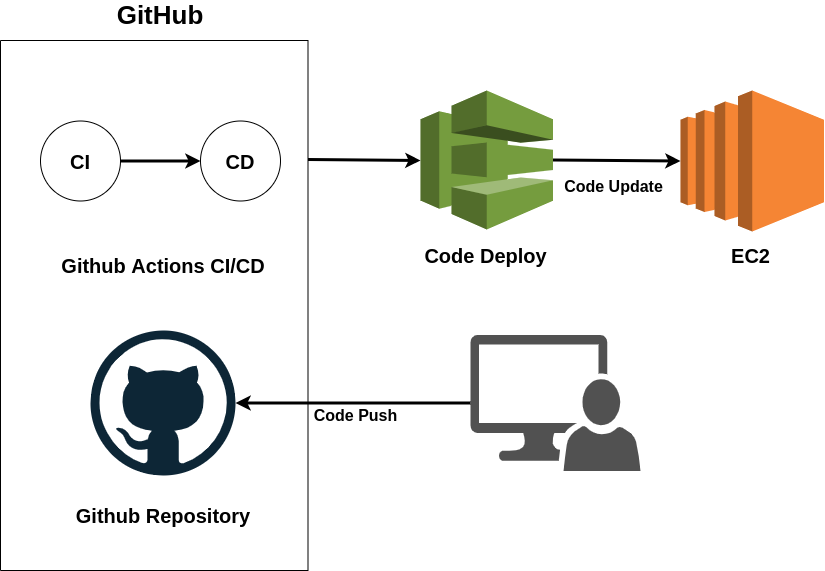
Setting Up a CI/CD Pipeline with Django, AWS EC2, AWS CodeDeploy, GitHub Workflows, and Docker
Overview
This guide walks you through setting up a robust CI/CD pipeline for your Django project using AWS EC2, AWS CodeDeploy, GitHub Workflows, and Docker. By following these steps, you'll automate your deployment process efficiently.
Project Structure Review
Before diving into the setup, review the structure of this project: Savannah GitHub Repository. Below are the key files involved in the pipeline:
1. GitHub Actions Workflow File: .github/workflows/cicd.yml
- This is the main configuration file outlining the CI/CD pipeline steps.
- Ensure all environment variables are stored securely in GitHub.
- To add secrets and variables:
- Navigate to your GitHub repository.
- Go to Settings > Secrets and Variables > Actions.
- Add each referenced environment variable under the Variables section.
2. Retrieving AWS Credentials for CI/CD
You need AWS IAM credentials for authentication and deployment.
Steps to Obtain AWS Access Keys:
- Go to IAM Console:
- Open the AWS IAM Console.
- Select an IAM User:
- Navigate to Users in the left sidebar.
- Click on the user you want to modify.
- Enable Programmatic Access:
- Open the Security Credentials tab.
- Scroll to Access Keys and click Create Access Key.
- Create and Download Credentials:
- Choose a use case (e.g., CLI or SDK).
- Click Create Access Key.
- Download the
.csvfile or copy the credentials securely.
3. Deployment Scripts (scripts/ folder)
- Contains essential scripts for deployment.
- These scripts automate the deployment process.
- Review the repository for specific command details.
4. appspec.yml File
- Defines how the application is deployed to AWS EC2 using AWS CodeDeploy.
- Calls the deployment scripts for execution.
5. Additional Key Files
deployment.yaml: Configuration for deployment settings.- Dockerfiles: If using Docker to containerize the application, review these files.
6. AWS CodeDeploy Service
AWS CodeDeploy is used to manage the deployment process. Alternative methods include SSH client connections, but this tutorial focuses on CodeDeploy.
Step 1: Setting Up AWS CodeDeploy
1.1 Create an IAM Role for CodeDeploy
- Go to the IAM Console:
- Open the AWS IAM Console.
- Create a New Role:
- Navigate to Roles > Create Role.
- Choose AWS Service > CodeDeploy.
- Click Next: Permissions.
- Attach Permissions:
- Search for AWSCodeDeployRole.
- Select it and proceed.
- Skip Tags, then click Next: Review.
- Name and Create the Role:
- Assign a name (e.g.,
CodeDeployServiceRole). - Click Create Role.
- Assign a name (e.g.,
1.2 Attach IAM Role to Deployment Group
- Go to AWS CodeDeploy Console.
- Select Your Application.
- Create a Deployment Group:
- Enter a group name (e.g.,
MyDjangoAppDeploymentGroup).
- Enter a group name (e.g.,
- Assign the IAM Role:
- Choose the role created earlier (e.g.,
CodeDeployServiceRole).
- Choose the role created earlier (e.g.,
- Configure Deployment Settings:
- Select Amazon EC2 Instances.
- Choose In-place Deployment (or Blue/Green if required).
- Load Balancer (Optional):
- If not using, select None.
- Specify EC2 Instance Tags:
- Example:
- Key:
Name - Value:
MyDjangoAppInstance
- Key:
- Example:
- Create the Deployment Group.
Final Steps
After setting up everything, your pipeline should be fully operational. Ensure:
- File names and directory structures match your project.
- Environment variables are correctly referenced.
- AWS and GitHub configurations are securely stored.
By following these steps, you will have a reliable CI/CD pipeline for your Django project using AWS, GitHub Actions, and Docker!